
OBS Studio has no reverb or echo filter. To add reverb to your singing voice on stream, you need a plugin. This guide shows how to load a free VST3 reverb into OBS, which scene to start from for each kind of song, and how to avoid the most common mistake: too much reverb.
Why OBS can’t load most reverbs on its own
OBS has a built-in “VST 2.x Plug-in” filter, but it only loads VST 2 plugins. Most plugins released today, including ours, are VST3 only.
To use a VST3 reverb, add atkAudio Plugin, a free OBS plugin that hosts VST3 plugins inside a filter. You need OBS Studio 31.1.1 or later (64-bit). The full setup, and what to do when a plugin doesn’t show up, is in How to Use VST3 Plugins in OBS Studio.
A reverb made for singing streams: ENCOREHALL
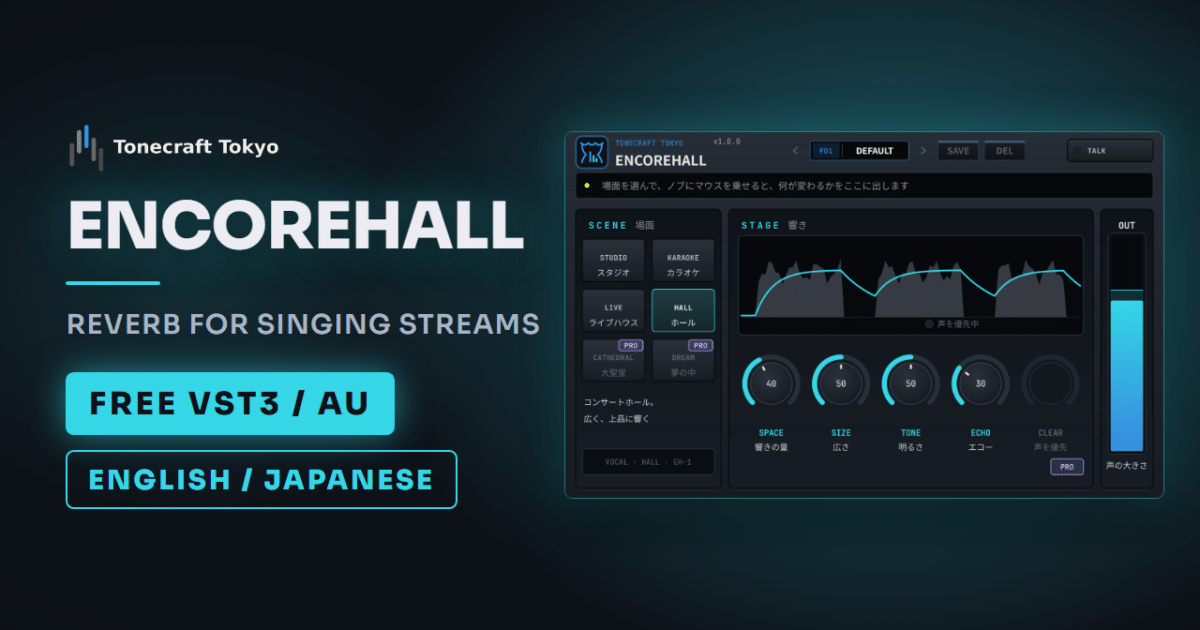
ENCOREHALL is a free reverb and echo plugin we made for streamers who sing (Windows VST3 / Mac VST3 and AU). Studio reverbs come with pre-delay, diffusion, damping and a dozen other knobs. ENCOREHALL has four: SPACE (amount), SIZE (room size), TONE (brightness) and ECHO (repeats).
Two things matter more on stream than in a studio:
- No added latency. Your voice stays in sync with your lips on camera.
- It never clips, however far you turn the knobs. The OUT meter shows whether your level is right for streaming.
Setting it up in OBS
Install ENCOREHALL first (the steps are on the product page). Then:
- Install atkAudio Plugin and restart OBS.
- Open “Filters” on your mic source, click “+” and add “atkAudio Plugin Host”.
- Click “Open Plugin Settings”, then choose “Scan for new or updated VST3 plugins” under “Options” (first time only).
- Choose ENCOREHALL from the list, click “Load Plugin” and open its window.
If you also use noise suppression or a compressor, put ENCOREHALL last in the filter list. If the reverb comes first, the fan and room noise get reverb too and stand out more.
Which scene to start from
Pick a scene first, then set the amount with SPACE. If you are not sure, start with HALL.
| Song | Scene | Notes |
|---|---|---|
| Ballads, slow songs | HALL | Turn up SIZE for a longer tail at the end of each phrase. |
| Karaoke-style singalongs | KARAOKE | Add ECHO for the classic karaoke repeats. |
| Rock, upbeat songs | LIVE | Keep ECHO low. Repeats pile up on fast lyrics. |
| Bright pop, acoustic | STUDIO | A short, clean room that keeps your voice up front. |
If the sound turns muddy or harsh, adjust TONE before touching anything else. There are also 14 presets for common genres (ballad, anime song, rock, city pop and more) if you would rather start from one.
Set the amount from a recording, not your headphones
While you sing, you hear your own voice through your head and the room, and almost none of the reverb. So it always feels like too little, and most people turn it up too far. Your viewers then hear a distant voice that sounds like it was recorded in a bathroom.
- Play your backing track at the same level you stream with.
- Record one verse and chorus in OBS.
- Listen back on earbuds, the way your viewers do.
- If the lyrics are hard to follow or your voice sounds far away, lower SPACE and ECHO.
You can hear the reverb live with OBS audio monitoring (“Monitor and Output”), but it arrives with a slight delay, so it is hard to sing along to. Use it only while adjusting.
When you stop singing and start talking
Chatting with reverb on makes you hard to understand. Press TALK in the top right of ENCOREHALL when the song ends. It stops sending your voice to the reverb, but the tail that is already ringing fades out naturally, so the last note of your song isn’t cut off. Press it again before the next song.
Free or Pro
The free version has everything in this guide. ENCOREHALL Pro adds CLEAR, which pulls the reverb down while you sing and brings it back in the pauses, so your lyrics stay easy to follow even with a lot of reverb. It also adds two more scenes (CATHEDRAL and DREAM), 20 presets, and a way to save your own settings.
ENCOREHALL Pro is $3.25 until November 30, 2026 and $5 from December 1. atkAudio Plugin is not a Tonecraft Tokyo product.