
Widen a pad or a chorused guitar with a stereo imager and it sounds great on headphones. Play it back in mono, say on a phone speaker, and the widened part can turn thin, or even the vocal in the middle can drop back.
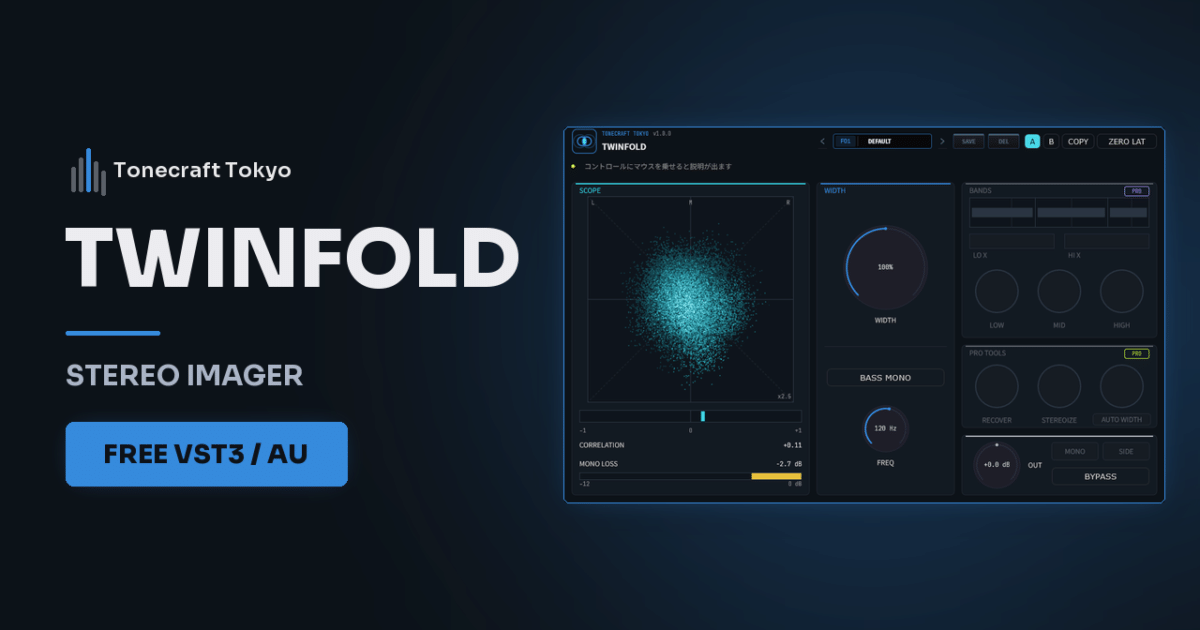
TWINFOLD is our free stereo imager. Whether you widen or narrow, the mono sum stays exactly the same.
- Widen sounds that are already wide, like pads or doubled guitars. Don’t widen the kick, bass or vocal
- Pull the low end to the center with BASS MONO. On a full mix, 100 to 140 Hz is a good starting point
- Keep an eye on the MONO LOSS meter to avoid overwidening. In the green, the level drop in mono is barely noticeable
Why widened sounds get thin in mono
A stereo signal splits into what both channels share (the middle, or mid) and what differs (the width, or side). A stereo imager widens by raising the side. In mono, left and right are added together, and the side cancels out.
Many stereo imagers also change the mid when they widen.
TWINFOLD processes only the side and leaves the mid untouched, so the mono sum stays the same wherever you set WIDTH.
What to widen and what to leave
Widening works on sounds that already have width: synth pads, double-tracked guitars panned left and right, reverb returns.
Centered sounds like kick, bass and vocals have almost no side, so raising WIDTH barely changes them. Keep that center backbone as it is and widen what surrounds it, and the whole mix sounds wider.
On WIDTH, 100% is the original width, 0% is full mono and 200% is the maximum. Start from the GENTLE WIDE preset (125%) and move up to WIDE (160%) if you want more.
Keep the low end in the center
If the low end differs left to right, it cancels on mono or large systems and the kick and bass lose their punch.
Turn on BASS MONO to sum everything below the FREQ setting to the center. On the mix bus or in mastering, 100 to 140 Hz is a typical range. To tighten only the lows without changing the overall width, start from the TIGHT LOW END preset.
Spot overwidening on the meter
Even when the mono sum keeps its tone, the more you widen, the less of the stereo signal is mid. In mono it sounds quieter than in stereo.
The MONO LOSS meter shows that drop. Green (−2 dB or more) is fine. In the yellow (−2 to −4 dB), listen on a phone speaker and check whether it sounds thin. In the red (below −4 dB), lower WIDTH.
On the phase correlation meter, +1.0 is full mono and 0 means left and right are unrelated. When it swings negative, much of the signal is out of phase and will tend to cancel in mono.
It narrows too
For material that is too wide to sit well in the mix, set WIDTH below 100% to pull it toward the center. The NARROW preset is 60%. The mid doesn’t change when you narrow either, so the tone stays the same and only the image tightens.
You can put TWINFOLD on a mono track, but a mono signal has no side, so WIDTH won’t widen it. To give a mono recording stereo width, use STEREOIZE in the Pro version. To avoid latency while recording or playing live, turn on ZERO LAT at the top right. Heavy widening of the highs can also add faint pre-ringing just before the attack, and ZERO LAT removes that too.
You need Pro when you want different width per band
TWINFOLD Pro sets the width separately for low, mid and high bands, so keeping the lows tight while widening only the highs takes one plugin. It also has STEREOIZE, which adds stereo width to mono sources, RECOVER, which compensates for level lost in narrowed bands, and AUTO WIDTH, which keeps the width steady automatically. The MONO and SIDE buttons let you audition the mono sum or the side alone.
Installation and controls are on the product page and in the manual. It runs on Windows (VST3) and Mac (VST3 / AU).