
Sometimes you add a stereo delay to a vocal or synth and the echoes just stick to the dry sound, so it only sounds thicker. Most of the time, it is because the echoes are playing in the same place as the dry sound.
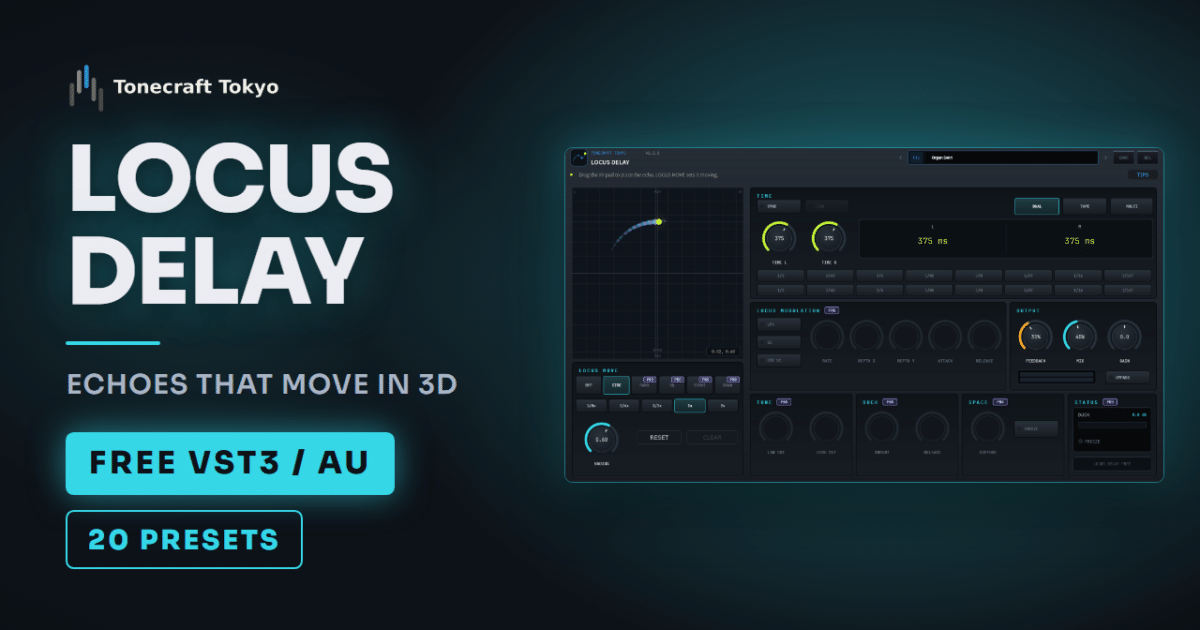
LOCUS DELAY, our free delay plugin, places the echoes front to back as well as left and right, and can move them in time with the tempo.
- Place the echoes away from the dry sound. For a centered vocal, move them to the side or further back
- If you move them, start around one orbit per bar. Much slower and nobody notices
- If it gets muddy, lower FEEDBACK before MIX
Why stereo delay can sound flat
A regular stereo delay can only place its echoes somewhere left to right. With the vocal in the center and the echoes in the center or panned slightly, the dry sound and the echoes reach your ears from the same direction and blend.
On headphones, you can tell sounds apart by near and far as well as left and right. With the dry sound near and the echoes far, they sound separate even from the same direction.
Start by placing it, without movement
In LOCUS DELAY, the XY pad on the left places the echoes: horizontal is left and right, vertical is near and far. Set LOCUS MOVE to OFF at first and compare positions only. The difference is easier to hear that way.
For vocal echoes, drag the point up to push them back. Pan to the side when the source already sits on one side, like a guitar or synth. Placing the echoes opposite the source balances the stereo picture without re-panning.
If you get lost, double-click the pad to return to the center.
If you move it, think in bars
Once you like the position, set LOCUS MOVE to CIRCLE and the echoes start to orbit. The speed follows the host tempo. At 1x they go around once per bar.
A slow setting like 1/8x, one orbit every 8 bars, is barely noticeable in a song. Slow it down only for long sustained sounds like pads or strings, where you want a gentle drift.
RADIUS sets the size of the circle. A larger radius makes the left-right swing obvious, a smaller one keeps it to a sway near the source.
Match the time and type to the source
The quickest way to set the delay time is to turn SYNC on and choose a note value. The delay stays in time if the tempo changes.
For a short single slapback on a vocal, start from the Slapback preset. To let the last word of a chorus hang, try Space Long.
There are three DELAY TYPEs.
| Type | Sound | Good for |
|---|---|---|
| DUAL | Clear echoes that stay clean as they repeat | Vocals, piano |
| TAPE | Echoes that wobble and get rounder | Guitar, electric piano |
| MULTI | Rhythmic echoes in four steps | Arpeggios, percussion |
To hear the movement right away, Organ Swirl and Pad Wide are clear examples. Of the 20 presets in the free version, 12 already orbit with CIRCLE. Picking one with a similar movement and adjusting RADIUS and speed is faster than starting from scratch.
When the echoes get muddy
If the echoes get in the way of the dry sound, lower FEEDBACK before MIX. Fewer repeats means the echoes die away before the next note. Lowering MIX keeps the dry level the same and only makes the echoes quieter.
The Pro version adds DUCK, which lowers the echoes while the vocal is singing, and TONE, which cuts low end on each repeat. Pro also has sidechain movement, which throws the echoes left and right on every kick, and DRAW, which moves them along a path you draw on the pad.
The Pro features are shown one by one in the feature walkthrough video (about two and a half minutes).
Before you install
LOCUS DELAY is made for headphone listening. On speakers, the depth and movement are harder to hear, so dial it in on headphones.
It runs on Windows (VST3) and Mac (VST3 / AU). Installation and controls are on the product page and in the manual.